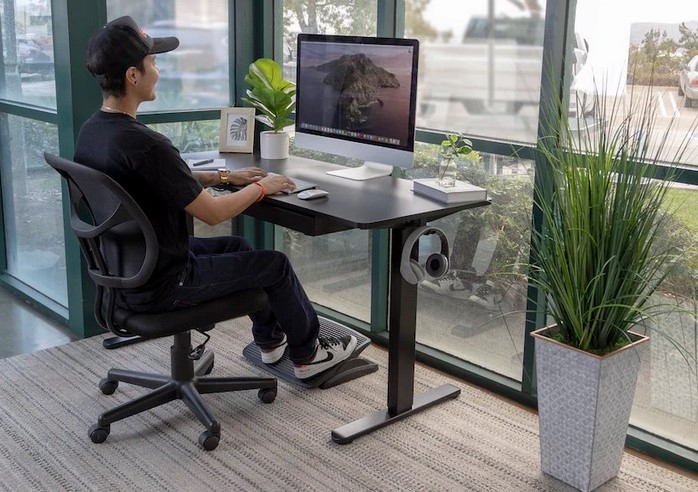
In today’s world, many people spend hours at their desks, whether for work, study, or personal projects. As we spend more time seated and engaged with digital devices, it becomes increasingly important to consider the setup of our ergonomic workstations. An ergonomic workstation is designed to minimize strain on your body, prevent discomfort, and improve posture, which can have a significant impact on productivity and overall well-being. The goal is to create a workspace that supports your natural body mechanics, helping you stay comfortable throughout the day. In this article, we will guide you through the essential elements of an ergonomic workstation to ensure maximum comfort and efficiency.
The Importance of Ergonomics in the Workplace
Ergonomics is the science of designing work environments to fit the capabilities and limitations of the people using them. When it comes to ergonomic workstations, the focus is on creating setups that support healthy posture, reduce repetitive strain, and optimize comfort to prevent musculoskeletal problems like back pain, carpal tunnel syndrome, or neck strain.
A well-designed ergonomic workstation not only helps prevent injuries but also boosts productivity by allowing you to work more efficiently without discomfort or distractions. Poor ergonomics, on the other hand, can lead to chronic pain, fatigue, and even long-term health issues. Whether you’re working in an office, home office, or remote setup, taking the time to create an ergonomic workstation is a smart investment in your health and comfort.
Key Components of an Ergonomic Workstation
Creating an ergonomic workstation involves more than just choosing the right desk or chair. It requires careful attention to the arrangement of several key components. Here’s a breakdown of the most important elements to consider when setting up your workstation:
1. Choosing the Right Chair
Your chair plays a critical role in supporting your posture throughout the day. An ergonomic chair should promote a neutral spine position, provide lumbar support, and allow you to adjust the height to suit your body.
- Seat Height: Your feet should rest flat on the floor, with your knees approximately at a 90-degree angle. If your feet don’t touch the floor, use a footrest to keep your posture neutral.
- Lumbar Support: The chair should have built-in lumbar support to maintain the natural curve of your lower back. You can adjust the lumbar support based on your height and comfort preferences.
- Armrests: Adjustable armrests can help reduce strain on your shoulders and wrists. Ensure that your arms are at a 90-degree angle when resting on the armrests, and your shoulders are relaxed.
- Seat Depth: There should be a small gap between the edge of the seat and the back of your knees to avoid pressure on the thighs. The seat should be deep enough to support your hips but not so deep that it restricts blood flow.
2. Desk Setup and Monitor Placement
The desk itself should be spacious enough to hold all of your equipment and allow for easy organization of your workspace. The height and layout of the desk, along with proper monitor placement, are key factors in ensuring comfort and reducing strain.
- Desk Height: The desk should be at a height that allows you to rest your forearms comfortably at a 90-degree angle while typing. If your desk is too high or low, it can lead to shoulder and neck discomfort.
- Monitor Position: Position your monitor directly in front of you, about an arm’s length away. The top of the screen should be at or just below eye level, so you don’t have to strain your neck to view it. You should be able to glance down slightly to see the screen without tilting your head up or down.
- Keyboard and Mouse Placement: Your keyboard and mouse should be placed at a height where your arms can remain relaxed at your sides with your elbows bent at a 90-degree angle. The mouse should be within easy reach, and ideally, it should be placed at the same level as the keyboard to avoid reaching and straining your shoulder.
3. Proper Lighting and Workspace Organization
Good lighting and workspace organization are often overlooked when setting up an ergonomic workstation, but they are essential for reducing eye strain and maintaining a productive environment.
- Lighting: Make sure your workspace is well-lit to avoid straining your eyes. Natural light is ideal, but if that’s not available, invest in an adjustable desk lamp with a soft, warm light. Avoid harsh, direct overhead lighting or glare from windows.
- Monitor Brightness: Adjust your monitor’s brightness and contrast to match your environment. Too much brightness can cause eye strain, while too little can make it hard to read the screen.
- Workspace Organization: Keep your workspace organized to minimize clutter. Have frequently used items, like your phone, notepad, and pens, within easy reach to avoid unnecessary stretching or twisting. An organized workspace promotes better focus and efficiency.
Additional Tips for Enhancing Comfort and Health
While the key components listed above are essential for setting up a proper ergonomic workstation, there are several other tips you can follow to further enhance your comfort and overall well-being:
1. Take Regular Breaks
Even with the most comfortable setup, staying in one position for long periods can cause stiffness and fatigue. Take regular breaks to stretch, move around, and give your eyes a rest. The 20-20-20 rule is a simple way to reduce eye strain: every 20 minutes, look at something 20 feet away for at least 20 seconds.
2. Incorporate Movement into Your Day
If possible, incorporate movement throughout your workday. Use a standing desk, alternate between sitting and standing, or take short walks during breaks. Regular movement helps improve circulation, reduce muscle stiffness, and prevent discomfort.
3. Adjust for Proper Posture
Good posture is key to reducing strain on your muscles and joints. Sit back in your chair with your back fully supported by the lumbar area. Keep your shoulders relaxed, elbows close to your body, and wrists straight while typing. Avoid slumping or leaning forward, as this can lead to neck and back pain over time.
In conclusion, creating the perfect ergonomic workstation is essential for promoting maximum comfort and long-term health. By considering factors such as chair design, desk height, monitor placement, and proper lighting, you can significantly reduce physical strain and improve your productivity. Incorporating movement into your daily routine, taking regular breaks, and maintaining good posture are also key elements for ensuring comfort throughout the workday. An ergonomic workstation isn’t just about improving comfort—it’s about safeguarding your health and well-being. By investing in the right equipment and making small adjustments, you can create an environment that supports your body, enhances focus, and helps you work efficiently without discomfort.